
Custom HTML
Custom HTML is the method where you write the screen yourself from end to end. With an SVG animation you bind behaviour to objects; here you build the page and place the platform’s data in your own interface however you like.
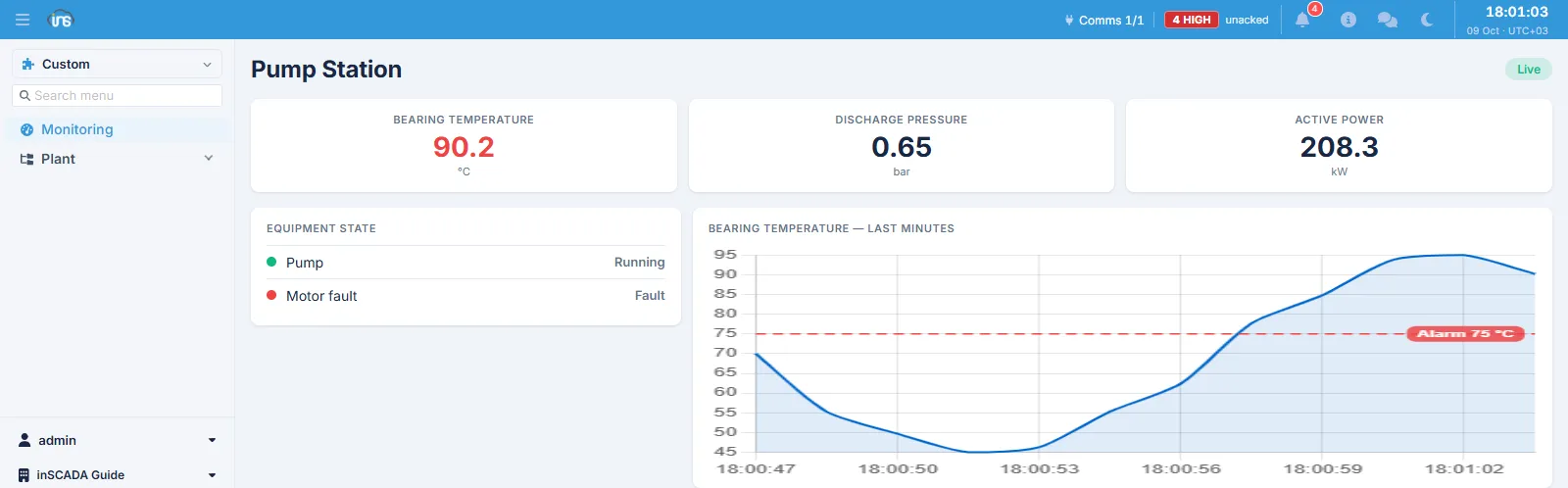
The screen above is built with the patterns on this page: a batched read, a rolling trend, a threshold line, and a status badge that says so when the data stops arriving.
Three fields
Section titled “Three fields”A page is made of three separate fields:
| Field | What goes in it |
|---|---|
| HTML | Markup only |
| CSS | Styling |
| JS | The page’s code |
Reaching the data
Section titled “Reaching the data”The page runs in an isolated frame and cannot call the platform’s API with fetch — such a request carries no credentials, and the security policy does not allow it either. The one way in is the InscadaApi bridge, which is already there on the page.
var api = new InscadaApi();
// a single valuevar v = await api.getVariableValue('Temperature_C');
// several at once — one round trip, and the one to prefervar all = await api.getVariableValues(['Temperature_C', 'Pressure_bar']);console.log(all.Temperature_C.value);
// writingawait api.setVariableValue('PumpCmd', { value: true });
Every method returns a Promise. Beyond variables, the same object reaches the alarm, connection, script, report and history methods.
Patterns for a live screen
Section titled “Patterns for a live screen”A live monitoring screen is only trustworthy when several things hold together:
| Pattern | Why |
|---|---|
| Batch the read | One request for ten tags rather than ten; the latency does not multiply |
| Poll every 1–2 seconds | Faster only loads the server, slower leaves the screen behind |
| Ring buffer | Keep the trend in memory at a fixed length and let the oldest fall off |
| Build the chart once | Update it each round rather than rebuilding, with animation off |
| A staleness watch | When the last successful read is old enough, fade the screen and say so |
| Fail softly | On a failed read leave the last values in place; let the status badge carry the news |
The last two are the most often skipped and the most worth having: when the data stops, a screen without them goes on showing frozen values confidently, and the operator cannot tell.
Do not build a chart on history reads: most variables have logging off, and the chart comes back empty. Poll the live value and accumulate it yourself.
Limits
Section titled “Limits”| Limit | Detail |
|---|---|
| Browser dialogs | alert, confirm and prompt do nothing — draw your own confirmation inside the page |
| External resources | Scripts only from the allowed CDNs (jsDelivr, cdnjs, unpkg); fonts from Google Fonts |
| Outbound requests | fetch/XHR to anything beyond those allowed addresses is blocked |
| Opening directly | The page opens only as a frame inside the platform |
Theming
Section titled “Theming”The page is handed the shell’s palette: when the platform switches between light and dark, the current colours are sent to the screen. So do not hard-code background, text and border colours — read them from variables, and the page follows the theme. State colours (healthy, warning, alarm) are the exception: they stay fixed, and should be chosen to read on either background.
To put a screen on the menu, see Custom Menus.
Related
Section titled “Related”- Custom Menus — binding the page to a menu
- Animation — the other method: binding behaviour onto an SVG