
Bar and Scale
Both change an object’s size according to a value, but for different jobs: Bar draws a fill indicator, while Scale grows and shrinks the object itself.
Shows the value as how full a bar is. Tank level, fill, percentage — anything read as a proportion.
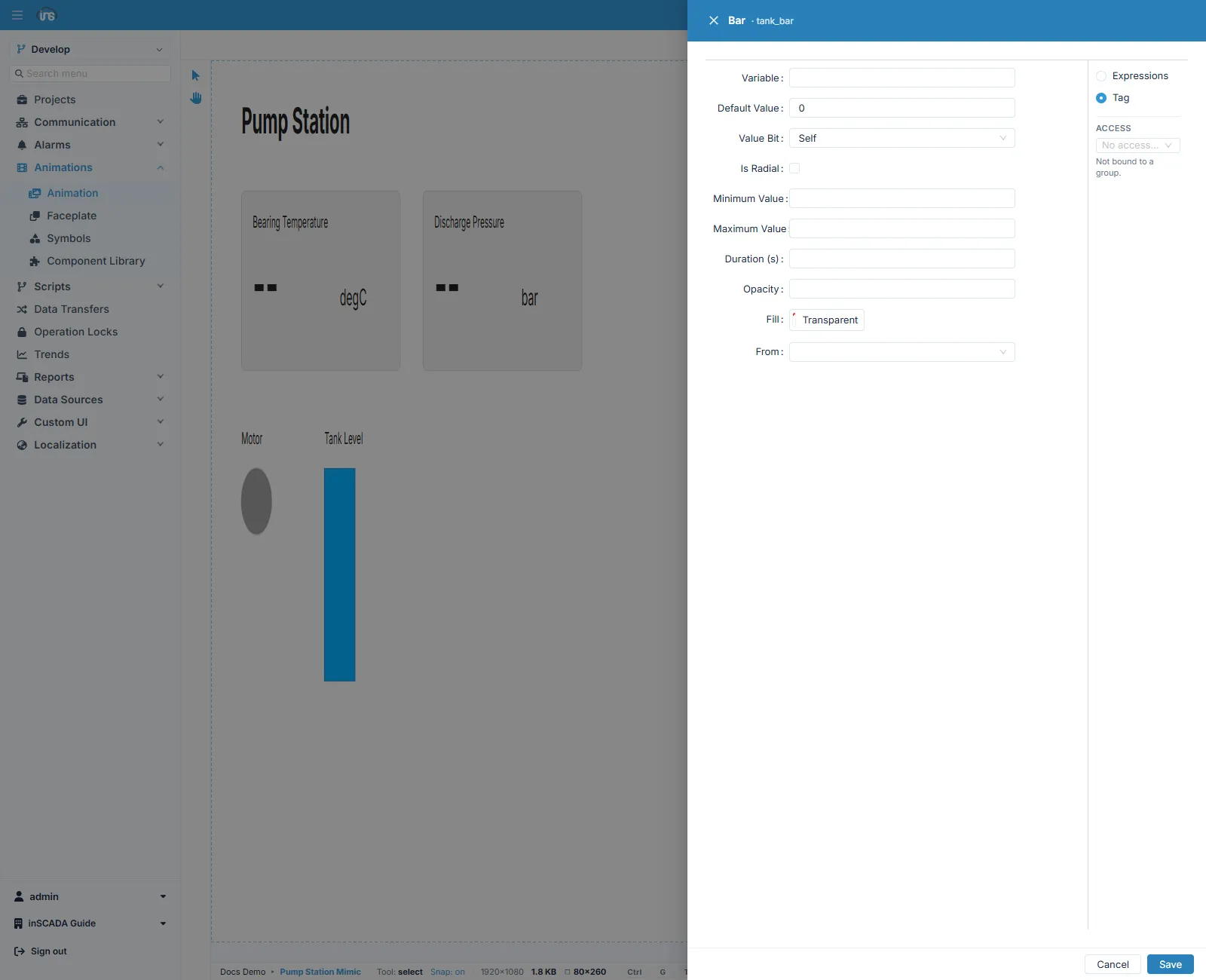
There are two modes: Expressions, where you compute the value in code, and Tag, where you bind straight to a variable. The form above is Tag mode.
| Field | Description |
|---|---|
| Variable | The variable to read |
| Default Value | The value used when it cannot be read |
| Value Bit | Self takes the whole value; choosing a bit index reads only that bit out of the word |
| Is Radial | Ticked, a circular indicator is drawn instead of a bar |
| Minimum Value · Maximum Value | The values at which the bar counts as empty and full |
| Duration (s) | How many seconds a change in fill takes |
| Opacity | The fill’s opacity |
| Fill | The fill colour |
| From | Which edge the fill starts from — Bottom, Top, Right, Left |
From is not only a visual preference: Bottom reads naturally for a tank, Left for a horizontal fill gauge. The wrong direction invites the operator to read the indicator backwards.
Deciding the fill settings at run time
Section titled “Deciding the fill settings at run time”Bar is one of the two types that can take its visual settings at run time (the other is Pipe). In Expressions mode, when the expression returns an object instead of a plain number, the fields on that object are used in place of the form’s settings. Detail: Element Editor.
Grows or shrinks the object itself with the value. It is used to make an indicator draw attention by growing, or to size a symbol by the flow through it.
| Field | Description |
|---|---|
| Variable | The variable to read |
| Default Value | The value used when it cannot be read |
| Value Bit | The whole value, or a single bit of it |
| Minimum Value · Maximum Value | The values the ends of the scaling correspond to |
| Horizontal · Vertical | Which axis to scale on — either or both |
| Origin-X · Origin-Y | The point the scaling is measured from |
The Origin fields are where most of the mistakes are: the default point is the object’s corner, so the object appears to drift in one direction as it grows. To have it grow from its middle, move the origin to the object’s centre.
Which to use
Section titled “Which to use”| What you want | Type |
|---|---|
| To show how full a level is | Bar |
| A circular fill gauge | Bar with Is Radial |
| The object itself to grow and shrink | Scale |
| A time series with axes | Chart |
Related
Section titled “Related”- Element Editor — the fields every binding form shares
- Rotate and Move — rotating and translating an object