
Plant Devices
in the Cloud
Reach your plant devices directly from inSCADA Cloud. PLCs, RTUs, meters, energy analyzers — all accessible through a single tunnel. No static IPs, no port forwarding, no firewall rules.
Plant Bridge is built for inSCADA Cloud.
The SCADA platform you'll connect your plant to is inSCADA Cloud — subscription-based, with Plant Bridge already inside.
The Traditional Cloud-to-Plant Path is Broken
Static IPs, firewall rules, IT approvals. Plant Bridge cuts the chain.
| Criterion | inSCADA Plant Bridge | Traditional Approach |
|---|---|---|
| Plant-side network changes | None — egress only | Static IP, port forward, NAT |
| Time to install | Minutes | Days (firewall + IT approval) |
| Operator knowledge needed | Paste Plant Code | IP, subnet, port settings |
| Connection direction | Plant → Cloud (outbound) | Cloud → Plant (inbound) |
| Encryption | WireGuard (modern, fast) | Often none / OpenVPN |
| Devices per tunnel | Unlimited, single tunnel | Separate rule per device |
| Cloud integration | Native inSCADA Cloud | Manual configuration |
How It Works
Field operator brings plant devices to the cloud in 4 steps
Get a Plant Code
Your engineering team provisions a Plant Bridge from inSCADA Cloud and emails the Plant Code to the field operator. Operators can also self-register at vpn.inscada.online.
Install the App
Download the Plant Bridge Windows app from the email link and install with admin privileges. Setup completes in a few minutes.
Paste the Plant Code
Open the app, paste the Plant Code, click Activate. The WireGuard tunnel is established in the background and the plant connects to the cloud.
Map Your Devices
In the app, add each device with its name, real LAN IP (e.g. 192.168.1.10:502) and protocol. Plant devices become directly reachable from inSCADA Cloud.
App Screenshots
A simple interface — operators learn it in a day
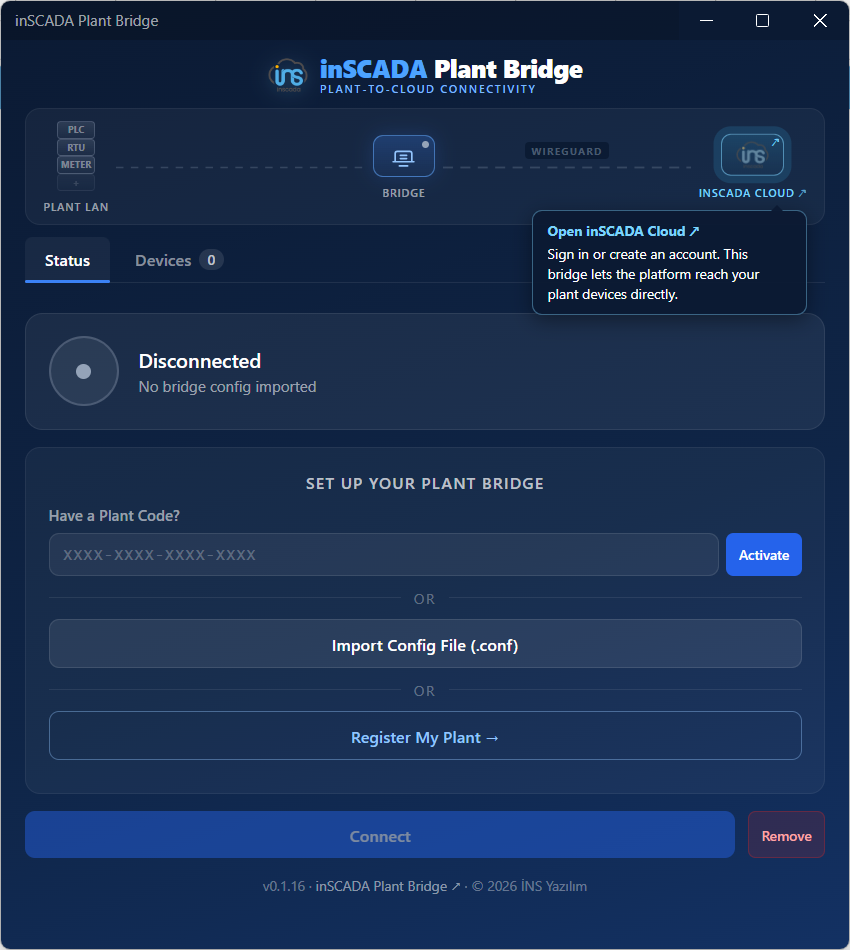
1. Paste Plant Code
Single setup screen on first launch — Plant Code, .conf import, or self-register
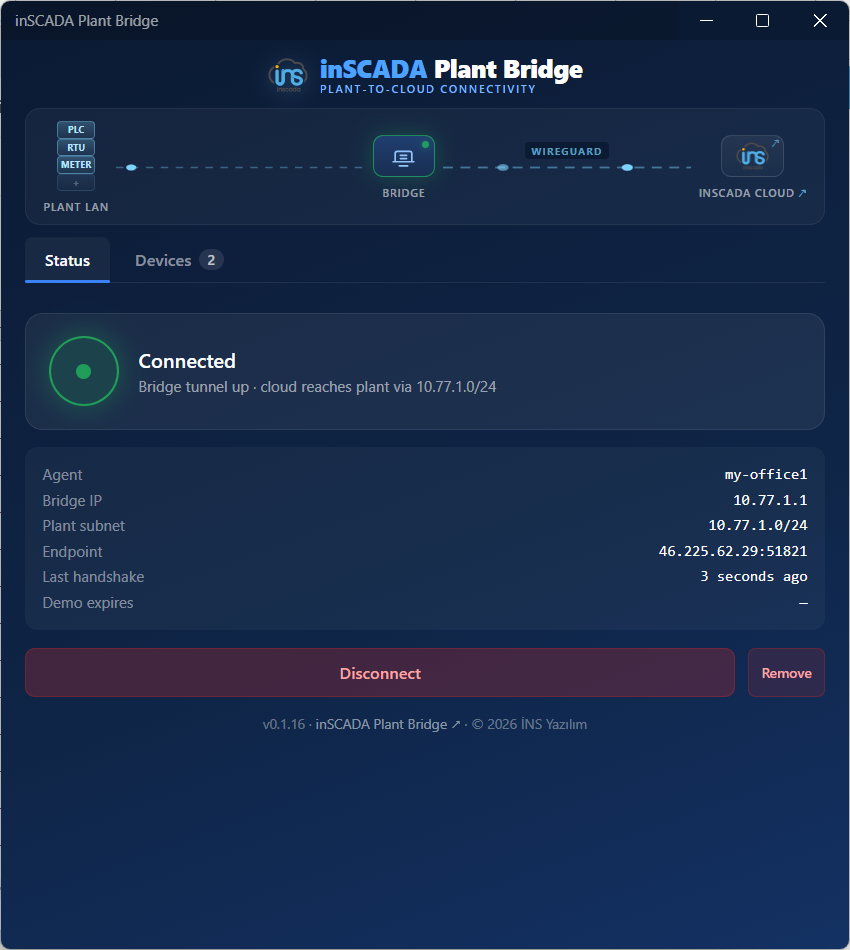
2. Tunnel Up
Bridge IP, plant subnet, last handshake, and demo expiry visible at a glance
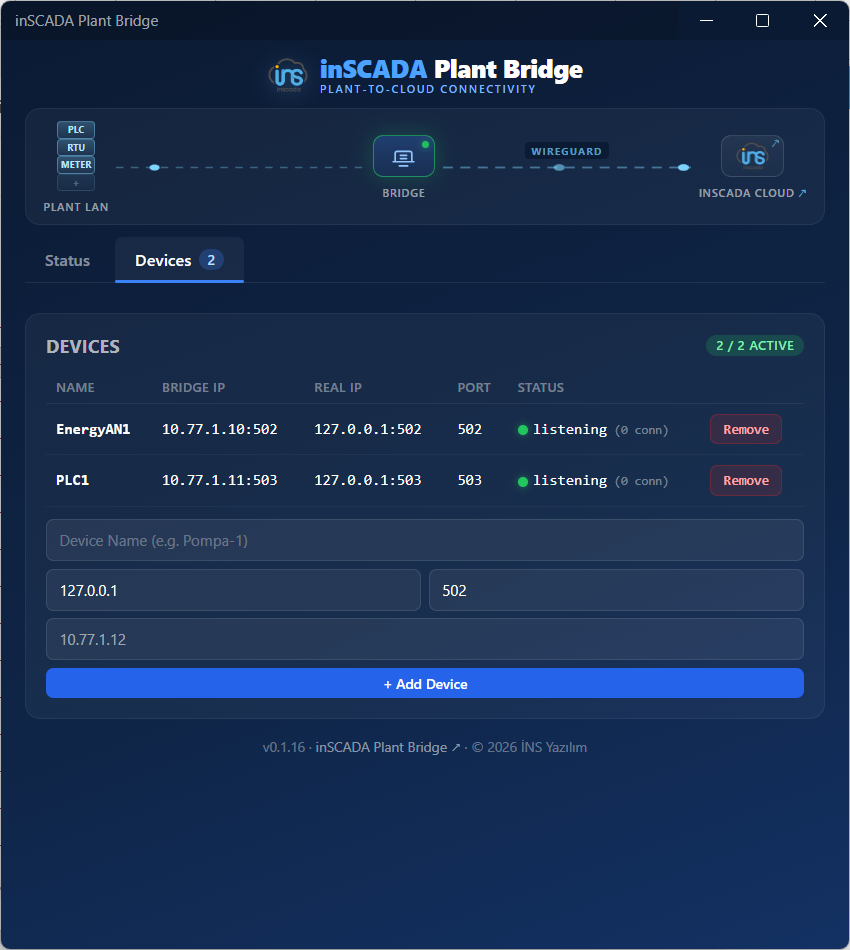
3. Device Mapping
Modbus, S7, OPC-UA, IEC-104 — each device gets a name + bridge IP + port. Cloud reaches them directly
Version auto-resolved — this link always points to the latest release
Three Ways to Get a Plant Code
Pick whatever fits your situation
Operator Self-Registers
Operator goes to vpn.inscada.online/plant-bridge/register, enters plant name + email. After email verification they get a Plant Code and install the app.
Invite from the Cloud
Engineering team provisions a Plant Bridge from the inSCADA Cloud UI; an invite email with the Plant Code lands in the field operator's inbox.
Manually via Admin Panel
A Plant Bridge agent is created through the inSCADA admin panel, and the .conf file is sent to the field team out-of-band (Slack, email).
Why Plant Bridge?
Built for industrial cloud integration
No Port Forwarding
Connect plant devices to inSCADA Cloud without exposing them to the internet. No static IPs, no firewall NAT rules, no port forwarding.
WireGuard Reverse Tunnel
Plant Bridge dials out from the site to the cloud (egress only). All traffic is WireGuard-encrypted. Your plant's internet line stays outbound-only.
One-Click via Plant Code
Phone-readable Plant Codes in XXXX-XXXX-XXXX-XXXX format. Operator pastes the code, clicks Activate, and the tunnel comes up.
Multi-Device Mapping
Define multiple devices under a single Plant Bridge. PLCs, RTUs, meters, energy analyzers — Modbus, S7, OPC-UA, IEC-104. Each device gets its own bridge IP and port.
Auto-Update
When new versions ship, the app updates itself. The field operator does nothing. Security patches roll out instantly.
Company-Wide Management
Send invites from the engineering office, extend demo durations, monitor tunnel statistics. All sites managed from a single admin panel.
Use Cases
The practical face of cloud-to-field connectivity
Cloud SCADA + Field Devices
Build your project in inSCADA Cloud and connect directly to plant devices (PLCs, RTUs, meters, energy analyzers…). No on-site server, no exposed IP — the plant joins the cloud SCADA ecosystem instantly.
Integrator Multi-Site
Manage dozens of customer plants from a single cloud SCADA. Install Plant Bridge at each site; your engineering office monitors and intervenes centrally.
OEM Machine Monitoring
Monitor the machines you sell worldwide. Embed Plant Bridge in every unit; collect production data and run remote diagnostics without touching the customer's network.
Rapid POC & Demos
Stand up a customer POC in 30 minutes. Even without physical access to the device, send the operator a Plant Code — data flows from the field to the cloud within minutes.
Security
Designed for industrial networks — no plant can see another
Tenant Isolation
All Plant Bridges share one WireGuard interface, but iptables blocks plant-to-plant traffic. Only the inSCADA Cloud peer can reach your plant.
Token Hashing
Agent tokens are stored as SHA-256 hashes on the server — useless if dumped. Plant Codes are single-use, valid for 30 days.
IP Binding & Monitoring
Source IP of every sync is logged; WireGuard endpoint changes surface in the admin panel. Suspicious moves raise an alert.
Signed Binaries
The Plant Bridge Windows app is signed with a GlobalSign EV certificate. Auto-update delivers new releases automatically — security patches never lag.
Pricing
Plant Bridge is free. You only pay for inSCADA Cloud.
Plant Bridge
Comes bundled with your inSCADA Cloud subscription
- Dedicated /24 network per site — every plant gets its own subnet
- Up to ~250 devices per site — PLCs, RTUs, meters, energy analyzers (Modbus, S7, OPC-UA, IEC-104, MQTT…)
- No expiry — runs as long as your Cloud subscription is active
- Signed binary + auto-update
- WireGuard-encrypted, plant isolation, token hashing
- Cloud panel, MCP integration, self-service onboarding included
Enterprise
For self-hosted, multi-tenant or OEM-embedded deployments
- Self-hosted Plant Bridge server — run your own WireGuard infrastructure
- Larger subnet allocation — /22 or beyond per site, 1000+ devices supported
- Multi-tenant integrator panel — manage dozens of customer sites from one place
- OEM white-label — ship under your own brand on the machines you sell
- Custom domain and certificate
- 24/7 priority support + SLA
Plant Bridge isn't a standalone product — it's how you connect plants to inSCADA Cloud. As long as you have a Cloud subscription, all Plant Bridge infrastructure is included.
Bring Your Plant to the Cloud
In minutes, your plant devices are reachable from inSCADA Cloud. Plant Bridge is free, bundled with your Cloud subscription.