
Devices & Frames
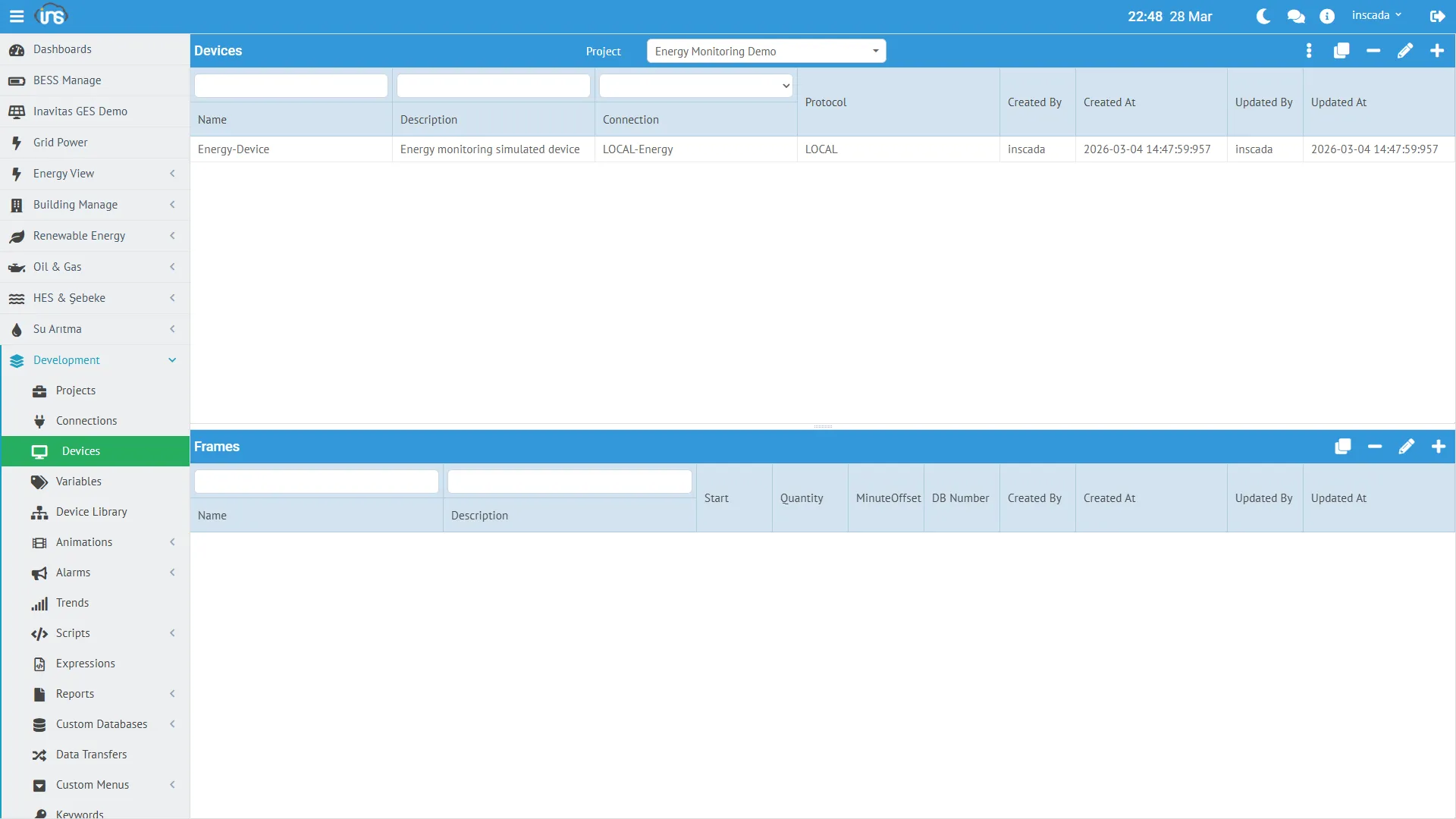
Device
Section titled “Device”A device represents a physical or logical unit on a connection. There can be multiple devices under a single connection.
Creating a Device
Section titled “Creating a Device”Menu: Runtime → Connections → Select Connection → Devices → New Device
| Field | Required | Description |
|---|---|---|
| Name | Yes | Device name |
| Description | No | Description |
| Scan Time | Yes | Read period (ms) |
| Scan Type | Yes | Read type (Periodic, OnDemand) |
Device Structure (Example)
Section titled “Device Structure (Example)”{ "id": 453, "name": "Energy-Device", "connectionId": 153, "dsc": "Energy monitoring simulated device", "scanTime": 2000, "scanType": "Periodic"}| Field | Description |
|---|---|
| scanTime | Read period in milliseconds. 2000 = reads every 2 seconds |
| scanType | Periodic = continuous reading, OnDemand = reads only when requested |
Scan Time Recommendations
Section titled “Scan Time Recommendations”| Scenario | Recommended Scan Time |
|---|---|
| Fast-changing data (power, current) | 1000 - 2000 ms |
| Medium-speed data (temperature, pressure) | 3000 - 5000 ms |
| Slow-changing data (energy meter) | 5000 - 10000 ms |
| Status information (on/off) | 1000 - 3000 ms |
Frame (Data Frame)
Section titled “Frame (Data Frame)”A frame is a data block read from a device. Each frame defines a specific address range. Variables reside within frames.
Creating a Frame
Section titled “Creating a Frame”Menu: Runtime → Connections → Connection → Device → Frames → New Frame
| Field | Required | Description |
|---|---|---|
| Name | Yes | Frame name |
| Description | No | Description |
| Readable | Yes | Is this frame readable |
| Writable | Yes | Can variables in this frame be written to |
| Scan Time Factor | No | Device scan time multiplier |
| Minutes Offset | No | Timing offset (minutes) |
Frame Structure (Example)
Section titled “Frame Structure (Example)”{ "id": 703, "name": "Energy-Frame", "deviceId": 453, "dsc": "Energy monitoring frame", "isReadable": true, "isWritable": true, "scanTimeFactor": null, "minutesOffset": null}Readable / Writable
Section titled “Readable / Writable”| Setting | Description |
|---|---|
| Readable = true | Frame is read periodically (monitoring) |
| Writable = true | Values can be written to variables in this frame (control) |
| Both = true | Both read and write (most common) |
| Readable = false | Write-only frame (setpoint sending) |
Scan Time Factor
Section titled “Scan Time Factor”Sets the frame’s read period as a multiple of the device scan time:
- Device scan time = 2000ms, Frame scan time factor = 3 → Frame is read every 6000ms
nullor1→ Read at the same period as the device scan time
Hierarchy Summary
Section titled “Hierarchy Summary”Connection: LOCAL-Energy (LOCAL, 127.0.0.1)└── Device: Energy-Device (scanTime: 2000ms, Periodic) └── Frame: Energy-Frame (readable + writable) ├── ActivePower_kW (Float, kW) ├── ReactivePower_kVAR (Float, kVAR) ├── Voltage_V (Float, V) ├── Current_A (Float, A) ├── Frequency_Hz (Float, Hz) ├── PowerFactor (Float) ├── Energy_kWh (Float, kWh) ├── Temperature_C (Float, °C) ├── Demand_kW (Float, kW) └── GridStatus (Boolean)This structure is the same for a MODBUS connection — the only difference is that protocol-specific parameters (slave ID, start address, register count, etc.) are added.